

How to protect your website from attacks – without technical knowledge
How to protect your website from attacks – without technical knowledge
What are Security Headers?
Security headers are like invisible shields for your website. They are short commands that your server sends to every browser that visits your website. These commands tell the browser: “Be careful, don’t trust that, avoid this mistake, keep this info safe.”
Think of your website as a store:
- Without Security Headers = open door, anyone can get in
- With Security Headers = security locks, cameras, and security guards
Why are Security Headers Important?
Without security headers, hackers can:
- Steal your visitor data
- Inject malware into your website
- Trick users into a trap (clickjacking)
- Hide your website in their own pages (iframe attacks)
How to Check Your Security Headers
The best part: You don’t need to write any code! Here’s a simple 5-step guide:
Step 1: Go to the Security Headers Checker Tool
Open the free online checker: securityheaders.com
Step 2: Enter your website address
Type your domain (e.g. example.com). Your passwords and logins are safe – the tool only sees public information.
Step 3: Click “Check yourself”
The tool checks your website in 3 seconds and shows you a result.
Step 4: Look at your rating
The rating ranges from A+ (perfect) to F (dangerous)
Step 5: Interpret the results
Each “header” has a name (e.g. Content-Security-Policy). When a header is green with ✓ = it’s active and protecting you. When red with ✗ = it’s missing and gives hackers a chance.
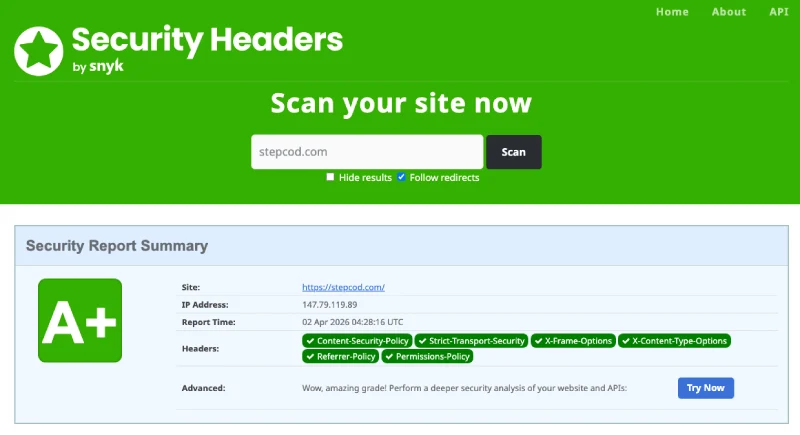
HOW IT SHOULD LOOK (A+ Rating)
This is what a SECURE website looks like. All critical security headers are active (green checkmarks). Your website has: – Strong protection against malware & attacks – HTTPS encryption active – Protection against data theft – Safe for visitors to browse – Google trusts your site more **Result:** You’re protected. Visitors are safe. Your reputation is secure.
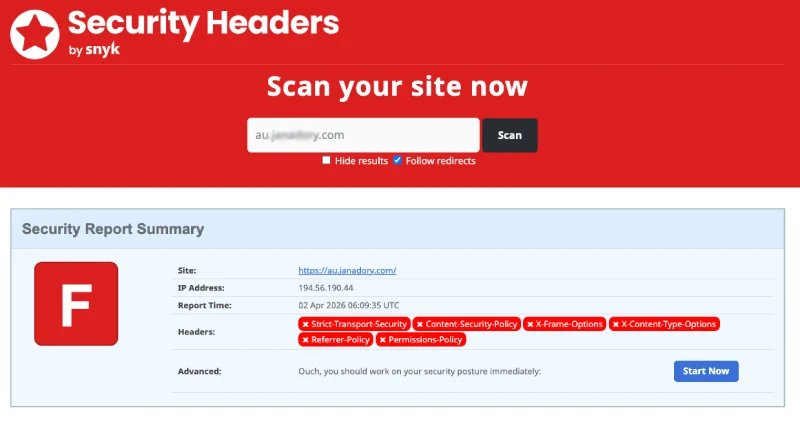
HOW IT SHOULD NOT LOOK (D or F Rating)
This is what a VULNERABLE website looks like. Multiple security headers are missing (red X marks). Your website risks: – Hackers stealing visitor data – Malware injections – Visitors getting trapped (clickjacking) – Browsers warning “This site is not secure” – Google ranking you lower – Legal liability if customer data is breached **Result:** You’re exposed. Visitors are at risk. Your business is in danger.
What Do the Most Important Security Headers Do?
| Header Name | What It Does |
|---|---|
| Content-Security-Policy | Prevents malware and malicious scripts. This is your main shield. |
| X-Content-Type-Options | Stops file abuse. Tells the browser: “This is HTML, nothing else.” |
| X-Frame-Options | Prevents your website from being placed in hidden frames. |
| Strict-Transport-Security | Enforces HTTPS encryption. Blocks spying. |
| Referrer-Policy | Controls what information about visitor behavior is sent. |
| Permissions-Policy | Determines which browser features your website can use. |
Next Important Security Measures
A good security headers rating is just the beginning! Here are other critical steps:
- Disable XML-RPC: If you use WordPress, disable xmlrpc.php – it’s a popular attack vector.
- Delete unused plugins: Every plugin is a potential vulnerability.
- Enforce strong passwords: Admin passwords should be 16+ characters with special characters.
- Enable two-factor authentication (2FA): Prevents your account from being hacked, even if the password is compromised.
- Make regular backups: If something goes wrong, you can restore it.
- Keep SSL certificate updated: Your website should use https:// not http://.
Conclusion
Security headers are the first step to a secure website. With securityheaders.com you can check in 30 seconds if your website is protected. An A+ rating means the foundation is strong – but don’t forget the other security measures!
Start checking your website today. It takes 30 seconds and can save your website from major attacks.